Modern Access Control Policies
How modern IT and security teams manage access controls in their environments
September 2025
Download PDFTable of contents
Introduction
This report covers how modern IT and security teams handle who gets access to what, what requirements are needed for access, and how access changes are approved.
Access management is one of those areas where organizations tend to converge on similar approaches — not because there’s some standard playbook everyone follows, but because the constraints are pretty universal. Most organizations are protecting similar types of assets (customer data, intellectual property, financial information), dealing with similar compliance requirements, and working with similar tech stacks.
What modern IT and security teams have actually implemented today is realistic: consistent patterns have emerged from real-world teams trying to balance security requirements with the need to keep their organizations functional. If you’re trying to decide what to implement in your organization, your peers have already figured out what works. Take their lessons and apply the same patterns to your organization.
What we mean by access control policy
Access control policy refers to the rules organizations use to determine who can access what resources and under what conditions.
This includes the full spectrum of an organization’s resources, encompassing both production and corporate environments. These policies define not just what people can access, but how they can access it — whether that’s requiring additional approvals, using specific devices, or certain conditions that users, devices, or the resources they access must meet.
For example, an access control policy might specify how engineers can access production databases only using a company managed laptop, with time-bound credentials, and only after getting approval from their manager. Or it might allow contractors working in support to view customer data only after providing a valid support case number.
For this report, we’re focused on policies that govern human access (employees and contractors) rather than machine identities or AI agents.
Executive summary
This report examines how modern IT and security teams across diverse organizations are implementing access control policies. Based on interviews with leaders from organizations ranging from 125 to 5000+ employees, we’ve identified five key patterns that define the current landscape:
Policy ownership is shifting from security-only to being jointly owned by security, IT, and the business.
While security teams historically defined policies and IT implemented them, organizations are moving toward shared ownership. More importantly, they’re delegating authority to business teams who understand their resources best. This means involving the business in defining requirements and setting policies, as well as handling approvals — with approvals going directly to app or resource owners, instead of the IT or security team who doesn’t have the context. This delegation helps policies stay grounded in operational reality while still allowing management of access to resources to scale over time.
Read more about policy ownership →
Controls should apply to data, not systems.
The strictest controls target customer environments and compliance-scoped data. Teams are starting to think more holistically about data classification — even if that’s just distinguishing between systems that do and don’t have customer data — and protect resources based on the kinds of data they have.
Read more about risk-based protection →
Moving approvals from IT to managers improves speed initially, but human approvals remain a bottleneck.
Delegating access decisions from the IT team to managers gets organizations notable gains in speed and improvements in user experience. But this initial unblock isn’t the end state — it’s still too slow, and without clear security benefit, since managers typically approve requests to unblock their teams. The real improvement comes from moving to app owner approvals, or automating approvals entirely where requests are consistently approved.
Read more about approval strategies →
Just-in-time pre-approved access for specific user groups is essential when implementing approval workflows.
When organizations try to reduce standing access, defining which users can have access allows them to easily invoke it without a more cumbersome process, while still minimizing risk and cost. This approach works well for common patterns, like engineers accessing production during on-call periods, or support staff accessing customer data with valid ticket numbers. For everything else, there’s always a manual IT approval.
Read more about improvements in access control →
More complex policy requirements are enforced when access is changed.
Access requirements can be enforced both when access is used, and when access is changed. Real-time context, as part of zero trust models, is used at authentication or authorization time, when a user authenticates to their account or attempts to access a specific resource. But baseline decisions as to whether a user should have access to a resource at all, often based on data from HR systems, and the requirements for doing so, are decided as part of access changes.
Read more about access control architecture →
Policy ownership and governance
Understanding who sets access control policies reveals the first major shift happening in organizations today — the blurring of traditional boundaries between security, IT, and business teams. Historically, access policies were owned by the security team, to ensure specific security requirements, with IT owning the implementation of those policies as the stewards of the corporate network. As more companies became tech companies — with production networks — this split persisted. Now, the lines are blurring.
-
The first shift in ownership is caused by IT and security becoming closer. We’ve realized that if the team setting the policy isn’t the one implementing it, they might not have the best grasp of any limitations in controls, and also don’t feel the pain when these controls don’t work in reality. The security team requests something that just can’t be done with the current tooling, and every exception ends up in IT’s lap. Increasingly, IT is merging or partnering with corporate security and reporting into the CISO.
-
The second shift is to give the business more ownership and control over their resources, by delegating authority. As SaaS has exploded and organizations have hundreds of apps, the sales leader has a better handle on who needs access to a sales outbound engine than the IT team does. IT and security teams are seeking more input from the business directly — and also seeking to delegate more responsibility.

Defining the policy is pretty often the security team. But that pretty often leads to policy that’s quite disconnected from what’s actually going on, and it doesn’t necessarily get enforced properly. The larger the company, the more likely they have a very optimistic access control policy compared to what’s really going on.
Who is involved in setting access control policies in your organization?
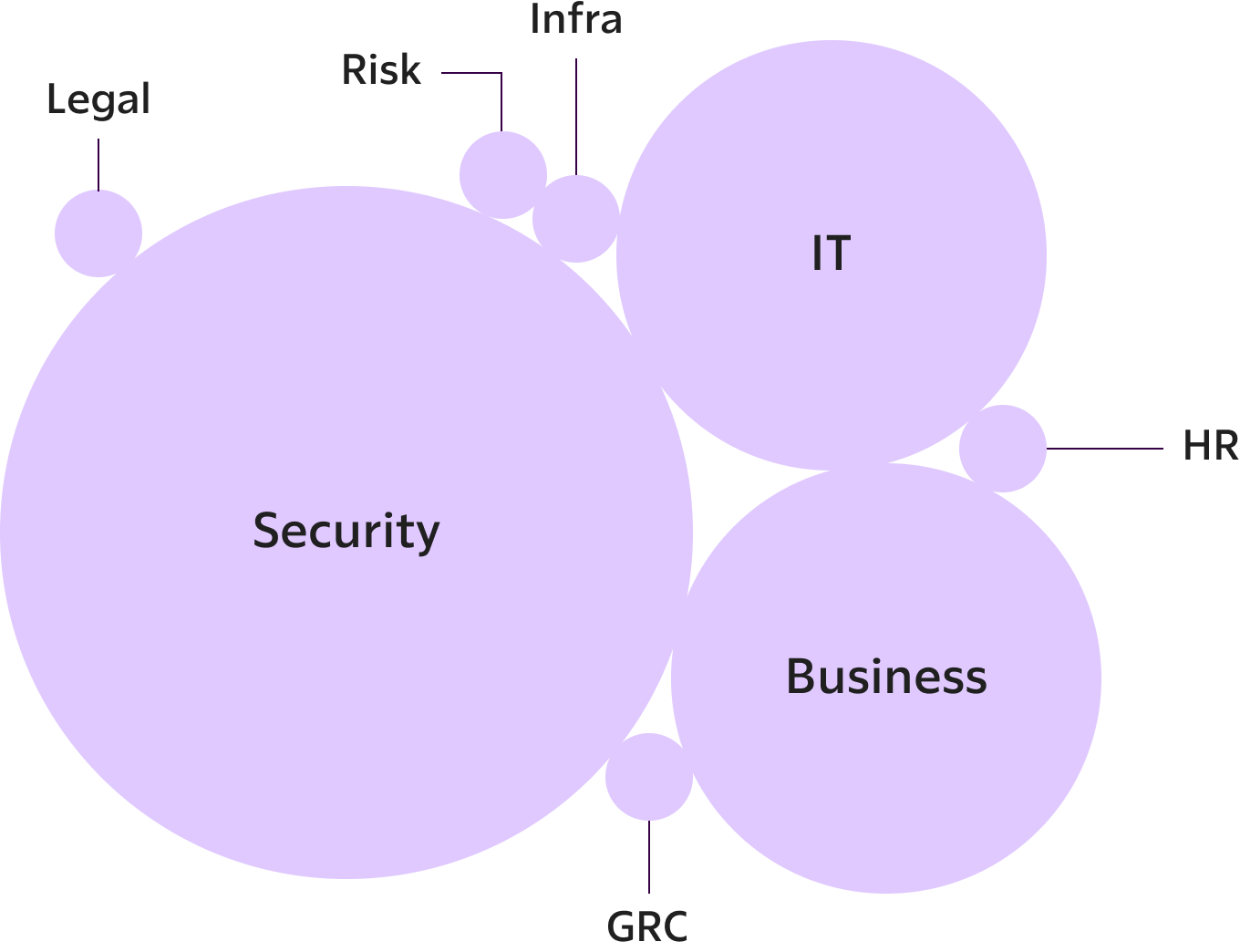
How the business is involved varies by organization. Many set app owners to be department leads, making them responsible for defining access requirements for and managing access to specific apps. In some cases, that’s sufficient: the business is able to run with that, and define requirements based on the constructs provided. But often, this is a dialogue, with the app owner defining what they want at a high level, and then coming to IT to translate that into what’s possible today. Business owners are rarely involved in the specific details of a policy.
There are also inputs to access controls that necessitate the involvement of other teams, like compliance or legal — but these teams are not the ones setting policy.
Delegating authority to the business makes sense when it’s a department-specific app, but that doesn’t always apply. The business can’t — and shouldn’t — do everything. A productivity tool like Notion, Miro, or Perplexity often doesn’t have a logical department owner, but might not be granted as part of inherent access to everyone in the organization, for example to save on license costs. In that case, managing access still falls back to IT.
Examples of how organizations define access control policies
In a data infrastructure company, GRC and Legal are heavily involved in setting access control policies, to ensure access doesn’t conflict with compliance requirements and commitments to customers.
In a public infrastructure company, different types of data have defined data owners, who are senior leaders in the organization. They define the policies, and delegate the management of approvals for specific access and exceptions to individuals in their organization who are closer to the affected resource.
In a 125 employee tech company, department heads come to IT to grant their org access to apps. IT is a partner who helps them calculate the budget implications, identify ways to reduce costs, and then implement the change — but the decisions are up to the business.
We can’t fully hand over access controls to the business because nobody really thinks about security. They just pick whatever works and don’t really have the patience to understand the permissioning system and give people the correct roles for what they actually need to do. So unless you have a security person working on this, I think you’ll just end up with everybody having admin pretty much everywhere.
We do not want an engineer asking another engineer: Are you a US citizen? A green card holder? … HR does that. They can set the permissions accordingly, and that unlocks access to things.
We have had things whereby you didn’t get access unless you went through a fingerprinting process… it’s [for] FINRA. Compliance doesn’t maintain and set the policies but it’s on the compliance team to maintain the list of authorized persons.
Risk-based protection
Organizations focus their strongest access controls on two types of data: customer data and compliance-regulated information.
The strictest access requirements are for customer environments: any single-tenant infrastructure being run on behalf of a customer, where an employee might need to access that infrastructure legitimately as part of a support ticket. Organizations without this infrastructure delivery model were most worried about customer data, and then their unique intellectual property — though AI companies increasingly reverse this prioritization.
We have to solve for data, not the system. The same data is in Snowflake, the same data is in BI tools, the same data is getting copied and…[in] presentations going out.
Other sensitive data includes employee data as well as financial data, reports, and sales forecasts. These notably matter more to public organizations, who have different responsibilities to protect this data. Financial data that might have been sensitive but not a top priority prior to an IPO, matters a lot more when you also need to worry about enforcing trading windows. What’s in scope for compliance requirements is usually more clearly defined: anything in the PCI environment is subject to controls for PCI.
Most organizations, however, don’t operate with a robust data classification model, and only track their most sensitive data types: they know whether a system contains customer data, but not much else. Any system with customer data gets a baseline set of controls, with additional requirements where required for compliance.
Enforcement tends to be stricter if there’s a specific compliance requirement to be met — that is, if the controls are actually audited. This doesn’t necessarily mean that enforcement is automated. These could still be highly manual processes.

Enforcement is better in finance, banking, around everything that’s in scope for Sarbanes-Oxley, but they typically brute force it with a lot of manual work… It’s not really automated, but once a week, someone’s going to go and revoke things that might have been forgotten. They build a lot of manual processes… for the things that are in scope of SOX.
Once they’ve decided what to focus on protecting, organizations must then decide where and how to enforce protections in their environment.
Access control architecture
Access controls can be enforced at multiple different points in time. This can be as part of the access itself, at the point of authentication or authorization. It can also be when the access is changed, either through a request — for permanent, temporary, or elevated access — and when access is reviewed for compliance.
If there are multiple options for enforcement, how do organizations choose where to implement these controls? The biggest limitation is what’s even possible with the tools they have.
Enforcement points
Access enforcement points
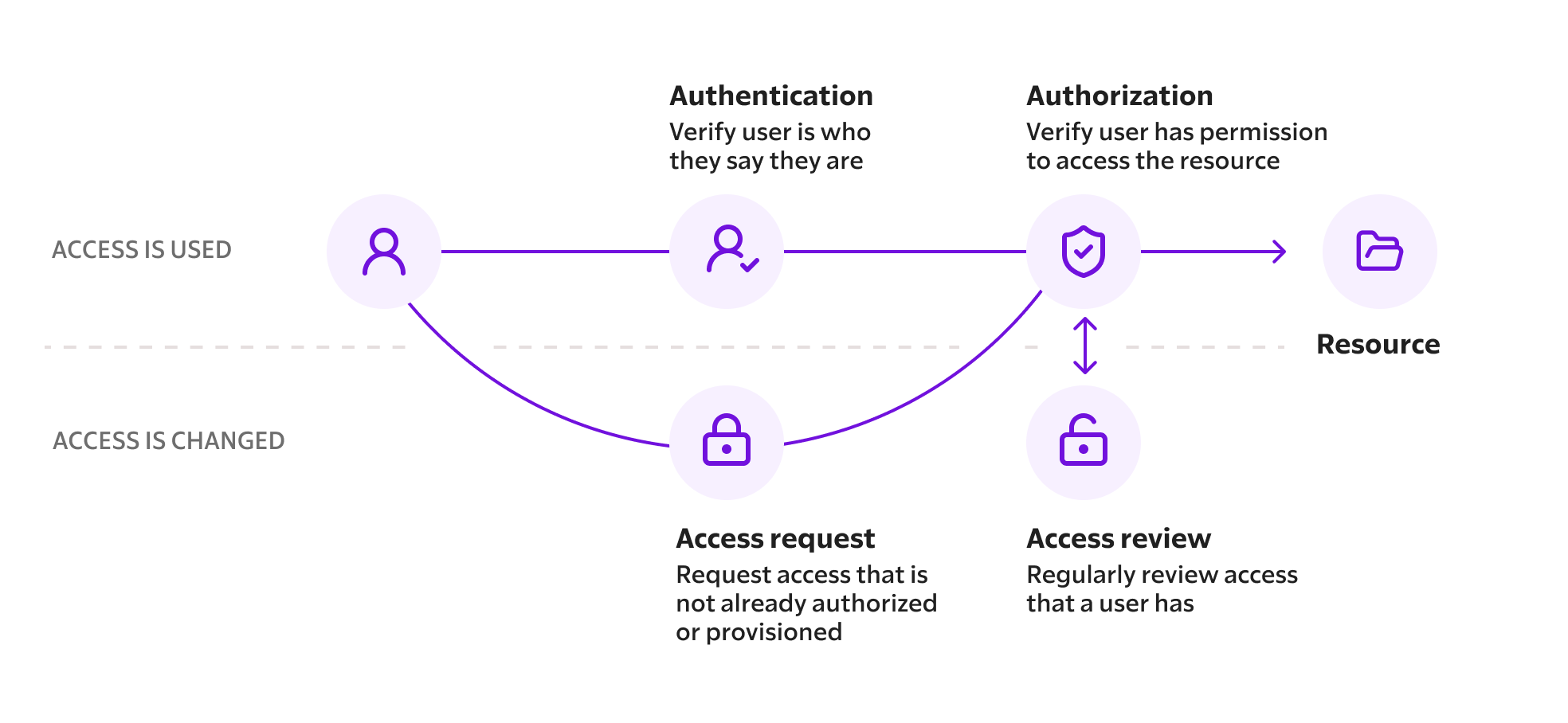
When access is used
At access time, authentication is done via an identity provider, or, more rarely in enterprise organizations, directly in an application with a username and password. This validates whether the user is who they say they are, and when their identity was last verified. With the advent of zero trust, the user as well as their device is authenticated at this point in time.
This is where organizations have the greatest variety of tools: although an IdP might check the user, an MDM, EDR or enterprise browser might check the device, and a VPN or SASE the network connection and location of the device. All of these inputs combine into an authorization decision. In addition, fine-grained authorization within an application is also often a point of enforcement, especially for production resources — for example, controls for specific AWS resources stay in AWS, or specific Databricks tables in Databricks.
Okta, today, is our main enforcement mechanism. We require strong auth and tie all of our device checks into Okta.
Where enforcement sucks the most is databases, business apps, traditional Active Directory, and then like your random SaaS. People build pretty good things around infrastructure as a service, SaaS not so much.
We don’t have a standard entitlement engine. We use Open Policy Agent (OPA) to define authorization requirements that are enforced through Microsoft AD, which also handles our authentication.
When access is changed
Changes to access are managed in an identity provider or directory, which maintains the source of truth for authorization. This isn’t necessarily a single system: whereas an organization might use Okta for managing corp access controls, they might also have prod access controls in AWS, and permissions for individual applications in those environments, like controls in Snowflake or Salesforce directly. And controls aren’t necessarily only at the identity layer — for example, network controls could limit users from even connecting to a resource without authorization. All of these systems need to be kept up to date as part of an access change.
Standing access is regularly reviewed to comply with compliance requirements, for example, by reviewing access every quarter — although in reality, access is rarely removed. Expiring access may also be reviewed to ensure no unauthorized behaviour: if access to a sensitive resource was only granted to perform a specific task, logs can be used to check that the user performed that task and only that task.
That usually leads to access inflation… like you’ve been working at this bank for 17 years, and you know, you started off as a database admin, and now you’re like a machine learning specialist, but you still have access to everything you had access to before.
In the larger orgs, I do…spot checks, like whenever elevated access was granted.
Enforcement is often done when access is used or changed, but that’s not the only way to enforce policy. Access is also logged and monitored, and this can be used to revoke access as a form of enforcement.
One organization who needed to comply with FedRAMP requirements first required users, who had to be US persons, to sign an agreement about accessing the FedRAMP environment prior to making a change to gain access. But instead of blocking access only at the point of access, if an active session is later detected to no longer be in compliance (e.g., from a non-US IP address), it is automatically disconnected. This continuous monitoring revokes access when requirements are no longer being met.
Technology stack
In practice, most organizations build their access controls around their identity provider as the main enforcement point, then glue additional tools on top to extend other functionality they need:
- IdP-integrated controls are the natural next step, like step-up authentication for sensitive actions, or geo-blocking, especially for sanctions compliance. These work within existing user flows, and are often already part of the IdP.
- App-specific controls handle the unique requirements of individual tools: native IAM for cloud providers, or application-specific roles for SaaS apps.
- Workflow automation helps handle approval requirements, manage offboarding, or integration with non-SCIM apps.
- Policies as code such as keeping cloud infrastructure IAM policies and Okta group rules in Terraform, or writing and enforcing policies with OPA, bring rigor to change management and auditing of access controls.
- Device-specific requirements are used by organizations implementing zero trust models, including device management, device trust, and device certificates.
- And finally, although specialized solutions like enterprise browsers can be used for enforcement, they’re usually deployed selectively rather than broadly. They’re typically rolled out to specific populations — support users or contractors — or for high-risk use cases like accessing customer data, connecting from unmanaged devices, or privileged SaaS sessions that need to be auditable.
Where a control is enforced is driven more by the team, and less so by the authorization system… It’s very inconsistent. We’re shipping our org chart.
User access patterns
Access control hierarchy
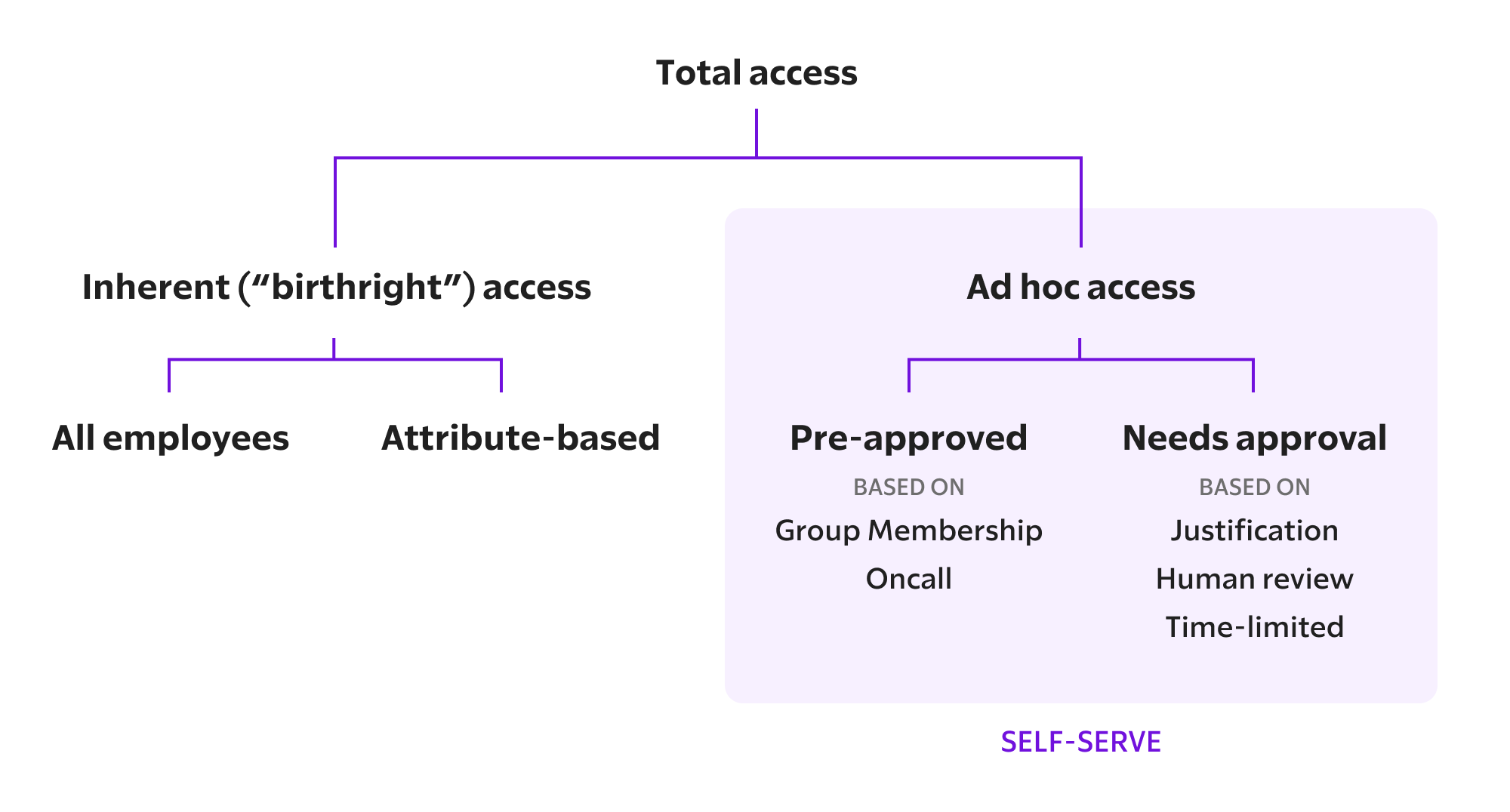
How are these enforcement points used to translate access control policies to practically support common user access patterns?
At the least risky end, organizations give users inherent (“birthright”) access to the basic applications all employees need to do their jobs.
Every organization has some form of self-serve access requests, allowing users to either automatically invoke or request additional access as needed to do their job. Yet every implementation varies slightly: different requirements, different approvals, and different levels of automation.
- These are for employees, not contractors or interns — who might remain restricted from certain resources, like costly licenses or tools that contain sensitive data.
- Most organizations have implemented inherent access for org-wide communication and productivity apps (like Google Workspace, Slack, or Zoom), but might also have inherent attribute-based access, usually implemented by department, so that, for example, all Engineering employees get access to GitHub on their first day.
- Most organizations have implemented some kind of automated approval, where an eligible group of users meeting a set of requirements can invoke access without further requirements.
- Some organizations use self-serve requests less for security, but as a way to control costs. Users only invoke a particular access when they need it — with no further steps required — so that they aren’t over provisioned for unused licenses.
Due to remote hiring and onboarding, some organizations restrict new employees’ access until they can verify the user’s identity. One organization gives new employees very limited access: to email the IT team and their manager, join a limited number of Slack channels, and use Zoom. This is sufficient for the user to complete onboarding, including employment or user verification, before they are granted broader access.
Everyone at [our company] has the access to do their job. They don’t have any more access. [But] there needs to be a frictionless but auditable way to get that extra access.
We have policies in place to allow a lot of self-serving within a reasonable realm, so that employees can self-serve tools they might need, without undue license costs.
We want to solve for productivity along with risk.
Self-serve requests are inconsistent and incompletely implemented: the future is here, it’s just not evenly distributed. Pre-approved workflows and specific approval requirements are generally only defined for the most common access scenarios, to relieve the biggest ticketing burdens. Every single other type of request reverts to the lowest common denominator: a ticket to IT.
Examples of self-serve access requests
- In a pre-IPO organization, licenses for Perplexity are available on-demand, to limit costs. This isn’t being restricted due to any security requirements — making these available self-serve enables the business to use what they need.
- In an organization with a small engineering team, engineers obtain just-in-time access in a self-serve way, that’s auto-approved. These access changes require a justification and are logged to prevent unauthorized activity.
- In a hyper growth startup quickly expanding its engineering teams, self-serve access requirements to production are segmented based on role: some users can self-approve, whereas some need to obtain explicit approval for access.
- In a health tech organization, users can self-serve access, but only to make changes for the permissions their role has, granting everyone with the same role consistent access.
- In a fintech company, engineers can self-serve prod access for a limited period of time, but any prod access request that deviates from that model requires explicit approval.
It’s auto-approved. But we log everything.
If you’re in the infra team, then you can request production access indefinitely. If you’re in the engineering team, you can request it while you’re on call. And then if you are not an engineer, then you need approval from the head of security.
We try to do role-based access control with no exceptions anymore…It was becoming overly tedious. We had people trying to cheat the system: ”I want this role, I want that role.” We don’t allow that anymore.
If it’s an engineer [and in a certain group] and they’re requesting 12 hours, and then they will get it by default. It’s all auditable through the workflow. So if it’s like a longer time frame, then it goes through a more complex approval system.
Rather than implement incrementally specific request flows, one smaller organization purposely keeps some requests general. For example, by granting prod access for a day to complete a configuration change, rather than a more tightly scoped access grant. This limits standing access but doesn’t overly complicate their grant model.
One organization uses self-serve requests for apps as a way to give employees freedom of choice while still limiting costs. Employees can request one of Cursor, Windsurf, or Copilot — but not hold licenses for these simultaneously. Since not everyone in the org needs to use the same IDE (just ask your local vim user), this gives users the ability to choose the tool that works best for them without needing to develop a separate management process.
To get access to the production network in one tech company, your access depends on the cluster you are accessing. For a given cluster, you need to be in the correct engineering group eligible to self-serve access — or you will need to obtain human approval. You also need to use a fully patched device. Your access can be automatically granted for a few hours.
The strictest access requirements are implemented in larger, often public, organizations where security materially affects their business — which also means they have the corresponding budget and headcount to implement these controls. The most restrictive controls and most complex approval workflows are almost always for production access.
But not all organizations can invest in these stricter controls and increased automation. Integration and configuration work can be substantial, and ongoing maintenance deters teams from implementing overly complex systems.
At the size that we have right now, we don’t have much of a luxury to automate exceptions and handle more complex security checks. We’re still doing this manually.
Approval strategies
There are a few inputs to a policy decision, in line with the original ideas from Google’s BeyondCorp: the user who needs access, what device they are accessing a resource from, the specific resource being accessed — and also, the properties of the request itself. Characteristics of each of these can affect the access control policy by defining specific requirements that need to be met for access. In practice, these seem to be predominantly checks related to characteristics of users.
Checks
Properties of users, devices, resources, and requests which organizations are currently using as part of their access control policies:
| Frequency | User | Device | Resource | Request |
|---|---|---|---|---|
| More frequent |
|
|
|
|
| Less frequent |
|
|
The first thing [we care about]… you’re coming in as a user that’s authenticated on our SSO and you’re doing that on a trusted device.
An important requirement is that the policy factors in an individual’s attributes, for example, “engineers might require only a peer approval vs. a contractor might require manager approval”. This is usually based on a user’s department.
It typically depends on what the application is… What’s this account? What is the increased access that they’re looking for? And then, how long is it for?
The reality is, someone just has to approve it. There aren’t any hard and fast, absolute requirements.
Human approvals
In addition to automated checks, there’s another common type of requirement: human approvals. Often, this is a compliance requirement, where a human review is needed to check a box for a specific control. In some cases, the requirement comes from IT or security, who are using these approvals as a speed bump or validation step to keep risks or costs in check.
In other cases, approvals provide specific validation: resource owners for access to a specific resource, managers for general oversight, or even peers if you’re fulfilling a compliance requirement.
Individuals who have been at the organization a long time have not only accumulated unnecessary access, but also accumulated unnecessary approval powers.
The CEO, CTO, founder, that has taken the company from seed or pre-seed, the whole way to IPO — and you’re like, dude, why are you Slack admin? Why are you the Google admin as well? … Why are you still the primary approver or admin in GitHub?
There’s a desire to minimize human approvals where they’re not strictly required. There’s a constant tension to balance security and compliance with speed and productivity — a human in the loop can’t be automated, and they inevitably slow down the user.
Because of this productivity hit, organizations are trying to move away from requiring arbitrary human approvals, and instead moving towards either requiring a specific human approval by an individual with context, or are automating approvals. Anything that doesn’t cleanly fit into these modes still ends up going to IT — and requiring a human review and approval.
In one organization, getting human approval from IT is more about cost control than about security.
Our role is really to inform whoever requests this, especially if they’re deciders or leaders, about the implication and costs.
Getting approvals from owners
The first part of helping reduce unnecessary human approvals is to only require them where a specific individual has the context and decision-making authority for the request. This is about delegating authority to app owners to approve changes to resources they manage.
Multiple organizations have found that requiring manager approval as a stopgap, for ‘oversight’, doesn’t work. Managers’ primary responsibilities are to help their teams, and this often takes precedence over enforcing security requirements. Requiring manager approval ends up helping with neither productivity nor with security.
The approver is usually the system owner, or somebody in security… Manager approval almost never works, because all managers always just say yes, because they just want to unblock their reports.... They have no context on the system. In some cases, manager approval makes sense, but in most cases, it doesn’t.
What we’ve seen… if you make it so managers can approve these things, they just approve them no matter what.
What’s very wrong, and in many, many places they do this, is they’ll check if you’ve got approval from your manager, which makes zero sense to me. Like, is my manager the owner of [this app] and everything that’s in it? … So I need root to everything, [because] my boss said so? That makes no sense. It needs to be the owners of the data or the application.
Auto-approving requests
The second part of reducing human reviews is to eliminate approval requirements where requests are consistently approved, and codifying these as auto-approval rules instead. For example, users in a certain group can access a certain resource under certain conditions, as long as they’re not granted long-lived access. A user can then auto-approve their access to these resources when they need it, without maintaining standing access.
Basically, it’s a free app… You can request it up to 90 days… and then, you know, it is auto-approved. So there are apps that are auto-approved like that.
We basically had approval automations… to set up some rules that would auto-approve.
Auto-approvals won’t work perfectly everywhere. There are cases where you may need two-party controls for compliance, or where it’s still too risky to grant access to all users meeting certain conditions. And there will still be exceptions for requests that fall outside what’s been pre-approved.
We don’t do any sort of just-in-time or break-glass stuff. We’ve looked at it. It just doesn’t work for us… The engineering team already has access to our AWS environment, which is probably the most sensitive one. We wouldn’t do break-glass for them. And we don’t allow any other team to really get in there and touch anything, so we don’t really need break-glass or do just-in-time. I’m still not convinced that it adds a ton of security value.
Just because you’re in the SRE group doesn’t mean you can access everything… only a smaller portion of the team is authorized to actually log into highly sensitive systems.
Approval patterns
Across organizations, patterns for access control policies consistently emerge in two places: for high-risk production access, where security defines the requirements; and low-risk corp access, where cost is usually the driver for controlling access.
- For high-risk production access, engineering teams can self-serve with requirements such as justifications or time-bound access — the motivation being to reduce standing access to production environments, without creating undue friction.
- For lower-risk corporate applications, employees can request access through streamlined approval workflows involving IT, managers, or app owners, primarily driven by license management and cost control. In some organizations, especially where the cost of licenses is less critical, these are self-serve.
Common requirements for prod access and corp apps
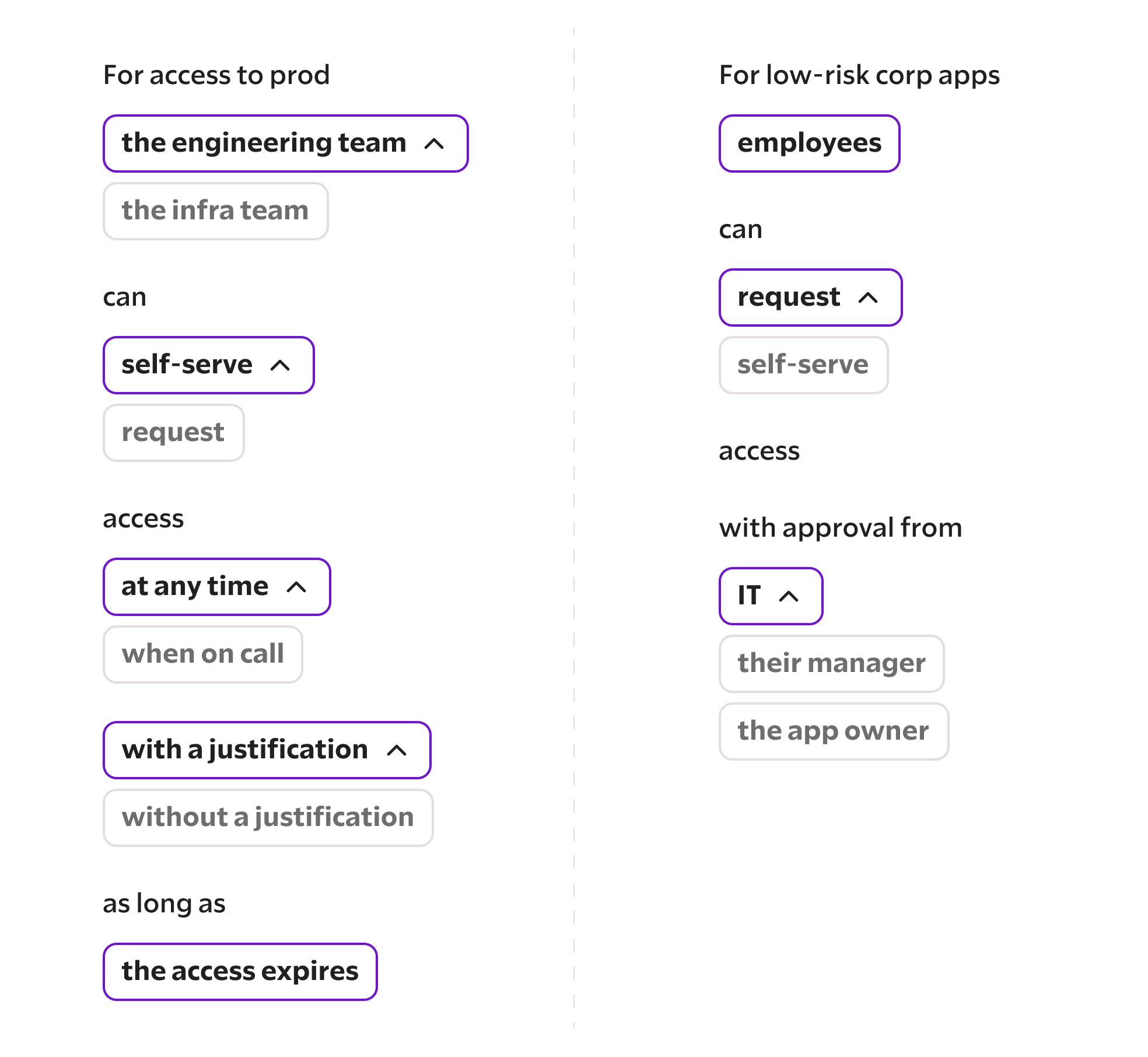
Requests that fall outside of these specific workflows tend to be less well defined — and that includes slight variations on these, for example, if a non-engineer were to request access to prod. These end up being exceptions, which may have a partially implemented workflow, such as requiring app owner approval, but often fall back to the IT and security team to handle.
Improvements in access control
As organizations mature in their access control policies, what are some of the constructs they adopt in order to allow access controls to scale? Scale isn’t necessarily related to maturity or org size, but often more tied to data sensitivity or compliance requirements. A smaller organization that has to comply with strict regulation feels the pain sooner and seeks to adopt some of these improvements sooner than a larger organization who doesn’t have a specific requirement to meet but is generally looking to reduce risk.
from
standing access
to
expiring access
Why?
For non-inherent access, moving to expiring access adds a natural point for re-evaluating whether a user should continue to have access — which helps prune unused access.

If you need the application, you request the application. There are very few applications where you can just access it or request it in perpetuity. Generally speaking, we limit it to 30 or 90 days. If you need it after that, you re-request it.
from
manager approvals
to
app owner approvals
Why?
Rather than ask managers for approval, which helps with neither productivity nor security, instead move the authority for managing access to a resource to the person who is already responsible for it. They’re the best placed to make decisions on whether access should be allowed.
As we mature our access controls, we won’t ask managers for approval. We will do that because the manager doesn’t always have access… it’ll most likely be the app owner.
from
human approvals
to
auto approvals
Why?
Where requests are always approved under certain conditions, automate this — or consider granting the access permanently.
We try to have most policies be self-approve, because most of the time, adding a human adds latency, adds additional work for the human doing the work, adds context switching. It’s very expensive to have a human in the approval process. Maybe in the future, we’ll use AI to do some of that.
from
unstructured justifications
to
structured justifications
Why?
A free form text field leads to garbage input from users, who are just trying to get unblocked quickly. Instead, ask for specific validation where it exists, like a support ticket. But just validating the regex of the input isn’t enough: you still need to validate it’s a real ticket number, and that the ticket is open and assigned to the user requesting access.
Users need to justify the access with either an incident tag or a ticket number… that ticket can be a Zendesk ticket or a number of JIRA projects that we use to track work.
Looking ahead
What challenges lie ahead in developing, implementing, and improving our access control policies?
How do we get consent to access customer environments?
For organizations hosting customer infrastructure, this is one of the biggest challenges. How can they get approvals on an ongoing basis, or as part of a support ticket, to debug an issue? What happens in the case of an incident?
I know how to do just-in-time access… but how do I get that approval cycle with a customer or an external party… in a way that is effective and not counter to productivity and incident management, incident response? That would be my biggest question.
How are we supposed to securely authenticate new employees or contractors remotely?
With more companies working remotely and hiring employees globally, there are growing concerns about getting a different person at the interview than on the first day of the job — or hiring a nation state actor. For security teams, this is not only about validating the identity of the user as part of the hiring process, but also limiting access for the user when they join the organization until their identity can be verified.
The interview to new hire to you get privileges to something pipeline is completely jacked up. We don’t have the appropriate controls in place. We did a background check. [But] you didn’t background check a person, you background checked the driver’s license… You don’t know if you were talking to the person with that driver’s license when you interviewed them.
Why are compliance access reviews not more deeply integrated with how we manage access controls?
Despite using the same underlying data, IT and security’s management of access controls feels completely disjoint from compliance’s access reviews. These are treated as completely separate and often duplicative processes. Furthermore, access reviews haven’t adopted to how access is managed in many organizations today, especially the huge volume of SaaS apps, large or distributed teams who might not know each other, and ad hoc access changes.
Access reviews seem, like, horribly broken. You push an access review button, and then get a spreadsheet or a table of a couple thousand different access provisions, and then you’re supposed to click approve or deny on each one of them?
We do quarterly or annual access revalidation where these people just get [asked]… are these still valid? And people will always say yes.
We’re most worried about non-human identities, such as ownership and management of shared service accounts, and how they’re performing recertification of those non-human identities. This is coming up as part of compliance. We’re learning a lot from the audit… the majority of findings come from the non-human identity segment.
What about protecting user credentials that I can’t manage, like OAuth and personal access tokens?
Organizations have spent time locking down the traditional human access paths and set access control policies for these — but what about delegated access? These access paths aren’t well understood by the business, and IT and security teams have little visibility into how they might be used.
An owner of the data or the platform might not understand the implications of… some weird OAuth third-party tool that’s just going to steal everything we got in HubSpot in like one second…. Who understands OAuth privileges? Then we get Salesloft Drift because the app owner gave these people the ability to install these third-party things on Salesforce. [They] didn’t know it was going to steal everything.
To get to our most sensitive data, you need to be on a company device, except the fact that some apps let you have personal access tokens. We deny those today, but it’d be good to focus on those for some people.
How do I build resiliency into my access controls?
Centralizing enforcement of controls in your IdP, and centrally managing changes to access controls makes it possible to (ideally) quickly understand what you’ve actually implemented in your environment. But what if that fails? Organizations are starting to worry what could happen if their identity provider is compromised, especially after breaches in recent years.
The other big thing is… eliminating single point of failures. That’s a really big one for us. We don’t want a singular system to be a single point of failure for both identity and authorization — and essentially, access… So that’s a big one. Honestly.
How am I supposed to get to a comprehensive set of controls?
Organizations already have to deal with shadow IT, but even if they have a handle on what apps their users are using, they can’t necessarily control these: not every application works with an SSO provider (or requires a higher pricing tier to do so), or can update membership via SCIM. This means that IT teams need a lot of glue to get a working access control solution. That’s also true for identity tools, where organizations need multiple vendors to meet their needs.
For startup and even medium-sized companies, it’s not a usable stream of things. It basically means… you’re going to have to hire one or two people who just do ClickOps to manage access. There’s no easy way to automate access provisioning for anything non-SCIM, non-SAML.
Why do people think they need to have an IdP, an IGA, an ITDR, and also, like, a PAM? What’s the driver for all those different solutions? The market with identity, it’s just exploded.
It’s a space where… everything is so messy… Identity is like that.
About this report
Research methodology
To research the content for this report, we interviewed IT and security leaders in ten different organizations to ask them about their access control policies. These organizations were in a variety of tech-enabled industries, and ranged from 125 to 5000+ employees. We asked them about access control policies:
- Which team handles these policies?
- How do you enforce them?
- What specific enforcement requirements do you have?
- How are approvals automated, if at all?
- What could be better?
Acknowledgements
Thank you to all those who graciously took the time to share what’s actually happening in their organizations. This kind of transparency about real IT and security challenges is what helps the whole industry improve its security posture.