What a great users page looks like

CEO / Founder
Every application has a list of users. But outside of adding or removing users when employees join, move, or leave, if you’re looking at that user list, chances are you’re there because of an audit, or an action you take for an audit like regularly reviewing access to your systems. It would be nice to be able to look in your identity provider to see all the access information at once, but unfortunately, the data that exists in your identity provider likely isn’t right — because even with single sign-on, unless you’re able to block any other authentication method, you could still have other users in the app.
We’ve been working on building user access reviews at Oblique, which means I’ve been staring at a lot of application user lists, both in admin interfaces and their exportable CSVs. Here’s what I wish every application had.
Somewhere in the admin settings of your app you should be able to find a list of users in your application and their roles. This is most likely a list of all users, but if your application is widely used within an organization, this might just be a list of admins, with the full list of users available elsewhere.
That list, at minimum, should:
- Uniquely identify individuals, which means not only using their names but also their emails
- Tell you the role the user has, and whether that role includes admin powers
- Tell you some information about the security of the user’s login method, such as that they log in via SSO, they have 2FA enabled, or they have a passkey
- Tell you the status of the user (are they an active user?) and ideally when they last logged in or used the application
- Make this information easily exportable, via a CSV download
It’s really not that much. If I could have the perfect table, it would be filtered only to active users and show: user, email, role, 2FA, and last login time. (If you only have SSO for your app — good job! — you get a free pass, but it’s still nice if you make that obvious from this page.) That can fit nicely in any UI and still show me everything I need to know at a glance. And it’s important to actually show this information, and not, say, truncate a user’s inconveniently long name (Johan Brandhorst-Satzkorn isn’t your colleague?), or sneakily paginate so you can’t easily see the full list.
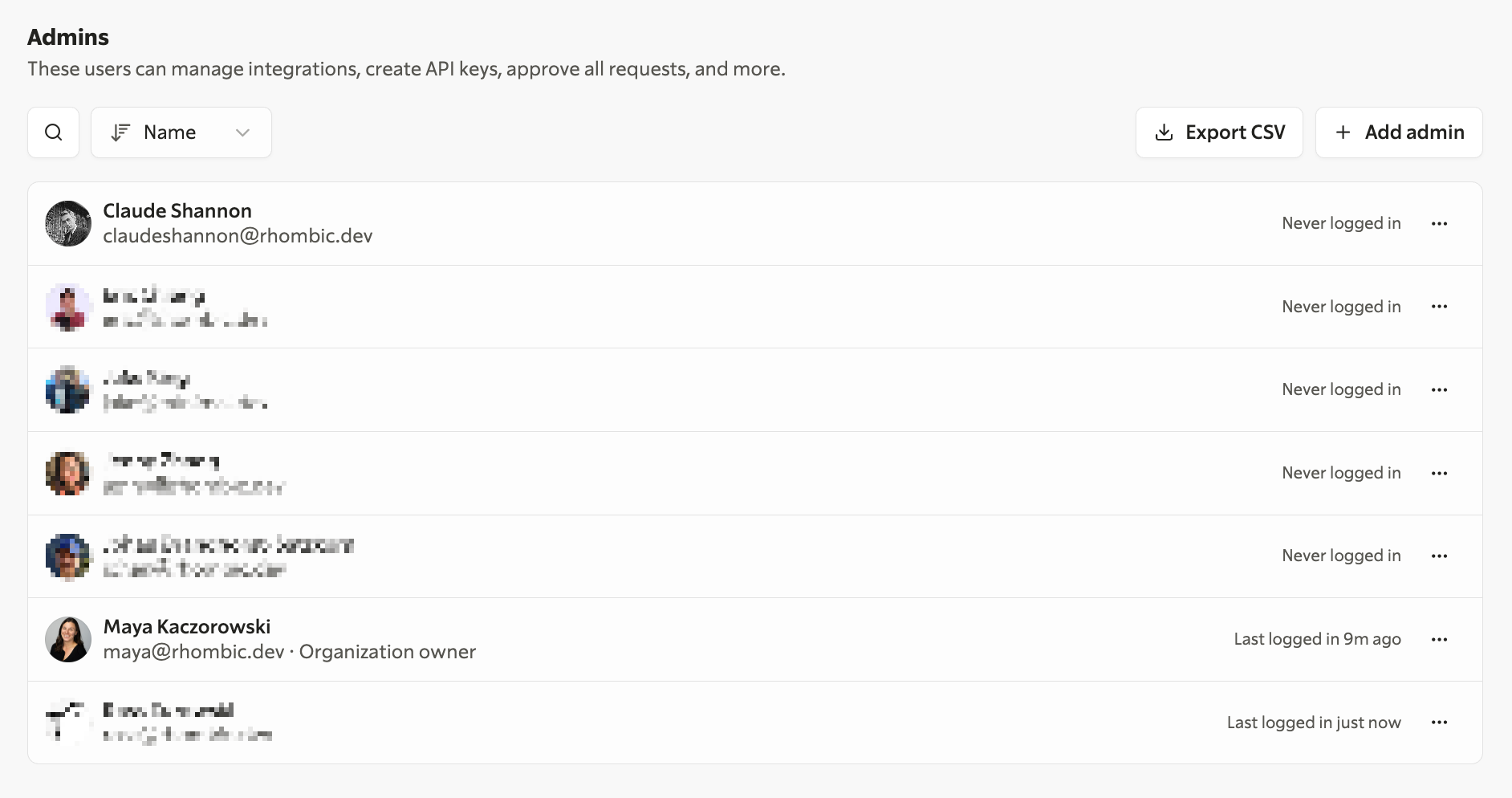
Here’s the admin table we have in Oblique, showing: user, email, whether they are the organization owner, and when they last logged in. Oblique requires SSO, so other authentication settings like 2FA and passkeys are enforced by the identity provider.
If you wanted to add more, a CSV export could additionally include any service accounts, deactivated users, and invited users; as well as when the user joined or was deactivated. You could also include information about the login method. And please, name the CSV something sensible, like myapp-admins-date and not users. I have so many files named users(2) on my desktop.
Name,Email,Admin role,Admin since,Organization owner,Last login,Terraform managed
Claude Shannon,claudeshannon@rhombic.dev,Admin,2026-07-14T21:26:20.545Z,No,,No
…
Maya Kaczorowski,maya@rhombic.dev,Admin,2026-07-14T21:26:20.461Z,Yes,2026-07-14T22:59:48.261Z,No
…
And here’s the corresponding admin table export from Oblique, which also includes when the user became an admin, their admin role, and if their admin user is managed via Terraform.
Don't structure this export in such a way that I need a pivot table to get to the info I really want. For example, if your application has teams and users can be part of multiple teams, then that should be its own table, not in this one. As when dealing with any data set, don’t give a column multiple meanings. Don’t have a single field for “status” which conflates deactivated, bot, and role fields all in one. And don’t have a data set where some columns depend on other columns without indicating the relationship, like showing me 2FA information even when the user can only log in via passkey. Sadly, I’ve seen all of these.
I’d also highly suggest you make all of your admin pages, including this users page, have a URL you can easily link users to. Ideally, this would be one that doesn’t depend on an organizational ID, though I understand that for much more complicated products with nested sets of permissions this can be hard to avoid.
As a product manager, I’ve always enjoyed making the little boring everyday parts of security almost enjoyable, where you’re pleasantly surprised to see that someone thought about the exact situation you’re in right now. Sharing best practices like this benefits us all, especially now that it’s so easy to implement. You could just point your agent at this post directly — you really have no excuse.