The performance bug hiding in our billing settings

Software Engineer
At Oblique, we run our backend on Google Cloud Run. It's a great fit for what we need: a Go binary, a Postgres database, and a handful of background jobs that sync data from upstream identity providers and integrations. Cloud Run handles the lifecycle, we ship containers, everyone is happy.
Until we started noticing slow database query performance.
This is the story of how it took us two months on and off building out our amazing observability stack: adding traces, switching tracing backends, enabling query insights on our database, chasing locks, hypothesizing about VPC networking… and ultimately learning that Cloud Run was throttling our CPU outside of HTTP requests. We didn’t need all of that, and a single one-line annotation on our Cloud Run service would have fixed the entire problem from day one:
metadata:
  annotations:
    run.googleapis.com/cpu-throttling: "false"
The rest of this post is about how we got there, why we didn't get there sooner, and why we’re still happy we did all the work.
The symptoms
Our backend has two kinds of work. The first is the obvious kind: HTTP requests from the frontend, served by a Connect handler running each request in a goroutine. The second kind is background work: goroutines are periodically kicked off by the same binary that serves the frontend, and these goroutines handle anything performance intensive: syncing data from identity providers and other integrations, recomputing group memberships, running garbage collection, and so on.
The HTTP request endpoints seemed to be unaffected, but the background jobs were unreasonably slow, even considering how much work they were doing.
We were seeing single SQL queries that should have hit an index and returned in tens of milliseconds take five seconds. Background sync jobs that locally took a couple of seconds were stretching to ten minutes or more. Our database connection pool (4 connections per instance) was constantly saturated, with pool acquisition calls themselves taking multiple seconds.
Our first instinct was to suspect the database queries, so that’s where we started.
Step 1: dive into the data
The first thing we did was look at the traces we already had. We'd been exporting traces to Google Cloud Trace from our Go backend for a while. Looking at our existing data, something was clearly wrong. Some background jobs were taking 5-10 minutes in production, but our existing traces weren't telling us why. We could see that a span was slow, but we couldn't see what the goroutine was actually doing during that time, what error it hit, or what query it was running. Our spans had almost no metadata. We could see the shape of the slowness without seeing the cause.
So, we started enriching our traces. GCP recently added support for consuming the OpenTelemetry trace format (OTLP) directly. We rolled out OpenTelemetry behind a feature flag, both to allow us to run trace collection locally, and to lean into the OTel ecosystem of libraries for observability data. It allowed us to run a Jaeger collector locally and inspect traces in real time while running the application against a local Postgres instance. If we could reproduce the slowness locally with better tooling, we'd have a much faster debug loop.
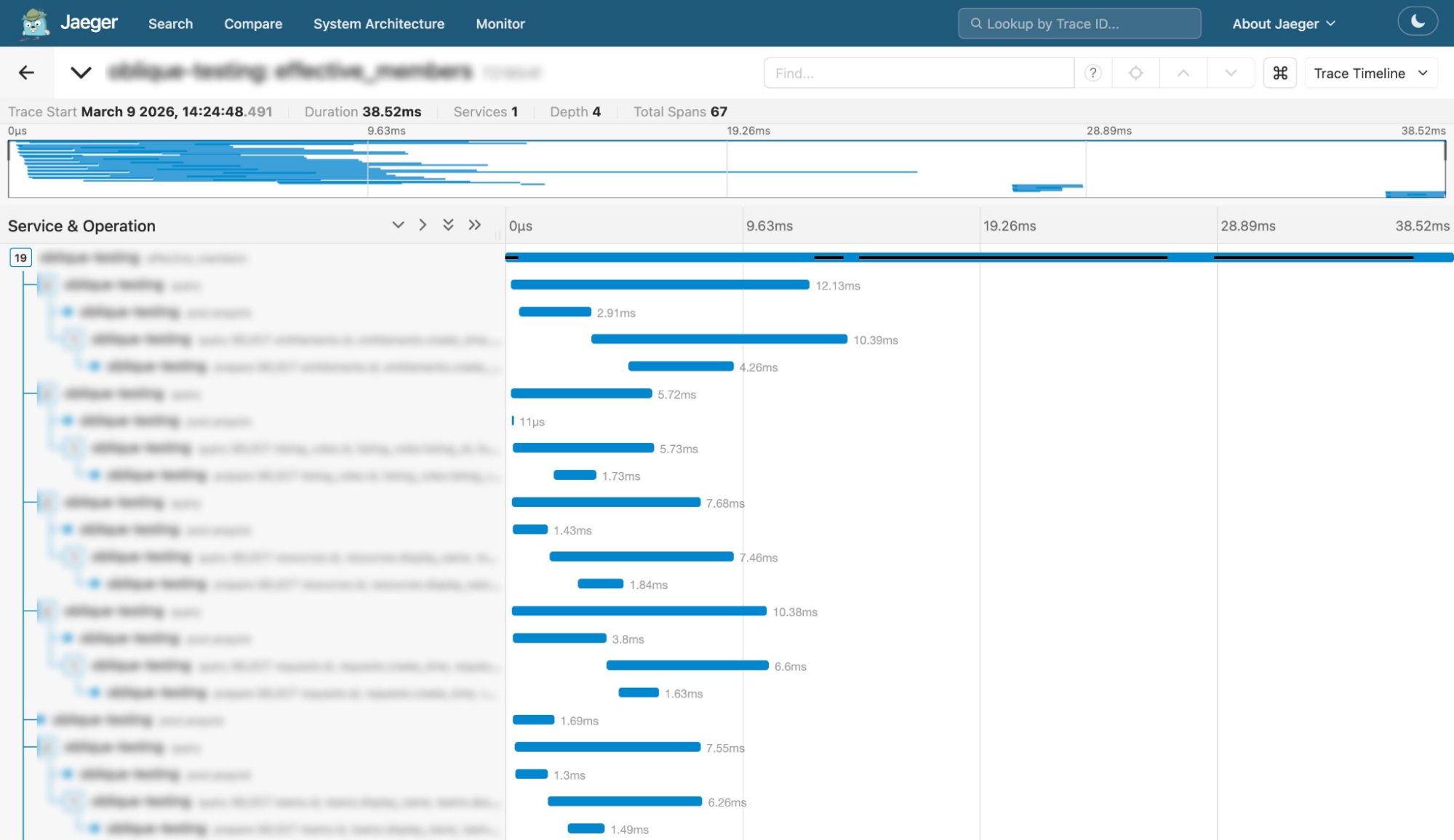
The results were immediate and clarifying: not a single trace locally took longer than one second against a local postgres DB. Whatever was happening, it wasn't a property of our code or our queries in isolation. Since our production environment is different from our local development environment, and identical code running in both environments exhibited different characteristics, that’s where the problem had to be.
Step 2: chase every hypothesis
Once we turned on OTel in production, we could see actual error messages on failed spans. We could see the pgx driver's pool.Acquire as its own span. We could see individual queries with their durations. We started forming hypotheses. We had a lot of them.
Hypothesis 1: too many SQL calls. One of our background jobs was making roughly 1,500 SQL calls per run, mostly because we weren't batching anything. We started batching the SELECTs and INSERTs. This was the kind of cleanup we'd been meaning to do for a while, and it did help, but not enough to explain the multi-second outliers. So, that wasn’t the issue.
Hypothesis 2: lock contention in the database. We thought maybe write locks from one job were blocking reads in another. We wrote some Postgres queries to look for blocked queries, looked at the Cloud SQL metrics, and turned on Query Insights. That helped us understand what part of the query was taking a long time, and the trend of queries over time. Something that was very confusing was just how big the deviation between individual identical queries was: taking anywhere from 200ms to 40s to run.

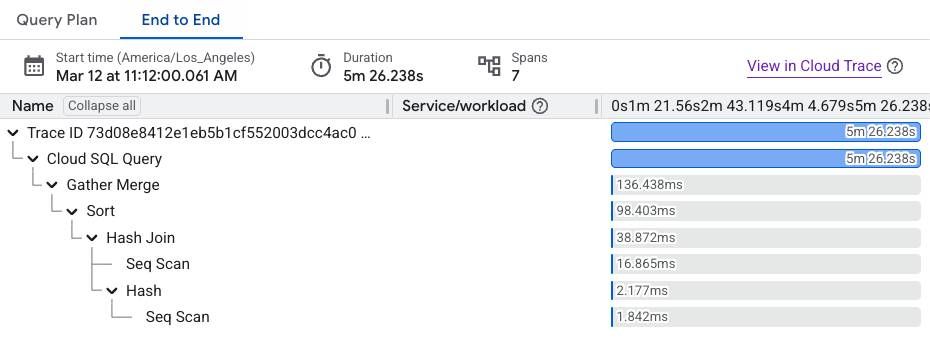
Another curious artifact that Query Insights allowed us to see was that we seemed to spend a lot of time downloading the result rows from the database:
We couldn’t find any evidence of lock contention, so it wasn’t that either.
Hypothesis 3: connection pool saturation. With only 4 connections per instance, any slow query starves the pool. This was clearly part of the problem. When you can see pool.Acquire taking seconds, the pool is your bottleneck. But it was a symptom, not a cause. Something was making individual queries slow, and the pool was just amplifying it. We were on the right track, but the pool itself wasn’t the issue.
Hypothesis 4: network latency between Cloud Run and Cloud SQL. The working theory at this point was that network latency was adding just enough overhead to cause individual connections to pile up. This became a leading hypothesis after we turned on Query Insights and saw that the majority of the query time was spent in downloading the result rows.
We then tried switching our Cloud SQL connection to using a private network connection, but it made no noticeable difference. A change we made at the same time however did make a surprising difference.
Cloud Run execution environments
Cloud Run has two execution environments. The first-generation environment is gVisor-based, a userspace kernel that intercepts syscalls. The second-generation environment runs your container in a Linux microVM with a real kernel. If you don't explicitly specify an environment, Cloud Run picks one for you based on the features your service uses.
The execution environments documentation recommends using the second generation environment if your service has CPU-intensive workloads or could benefit from faster network performance, so we pinned our containers to that environment, because we were willing to try anything at this point. After we’d made the switch, query performance improved:
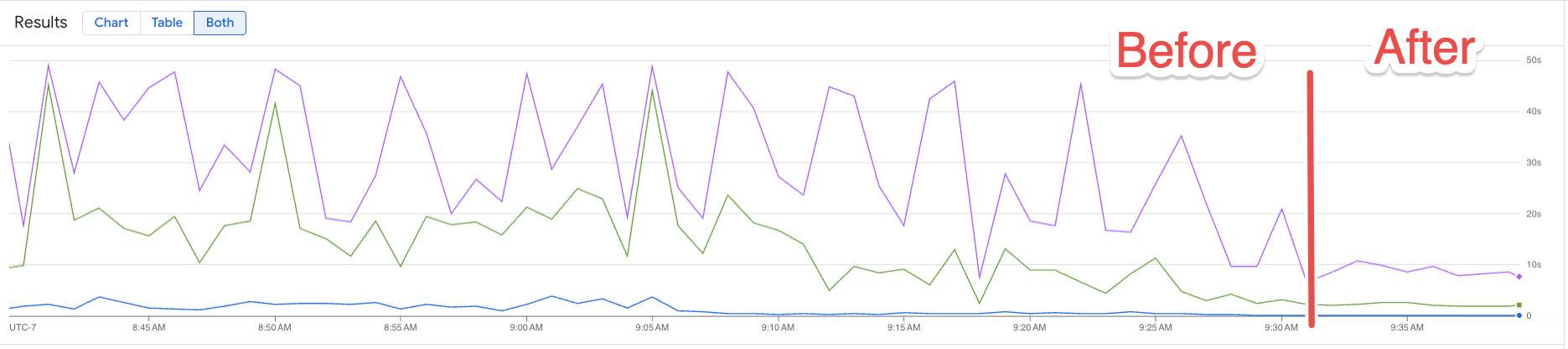
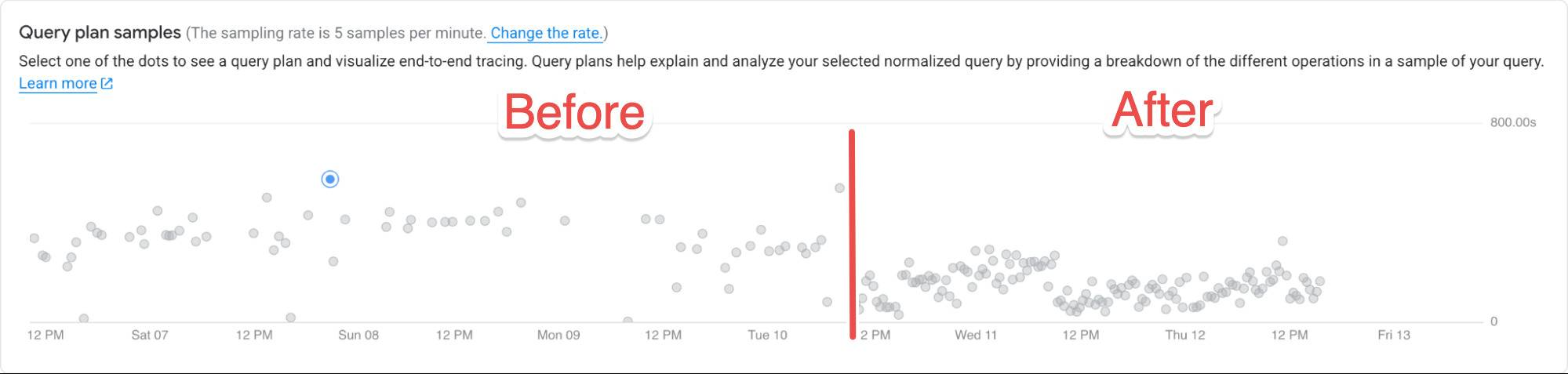
Pinning to the second generation environment was clearly an improvement. However, shortly after celebrating, we discovered to our horror that the query metrics went back up again. Not as bad as before, but still not where we wanted it to be.
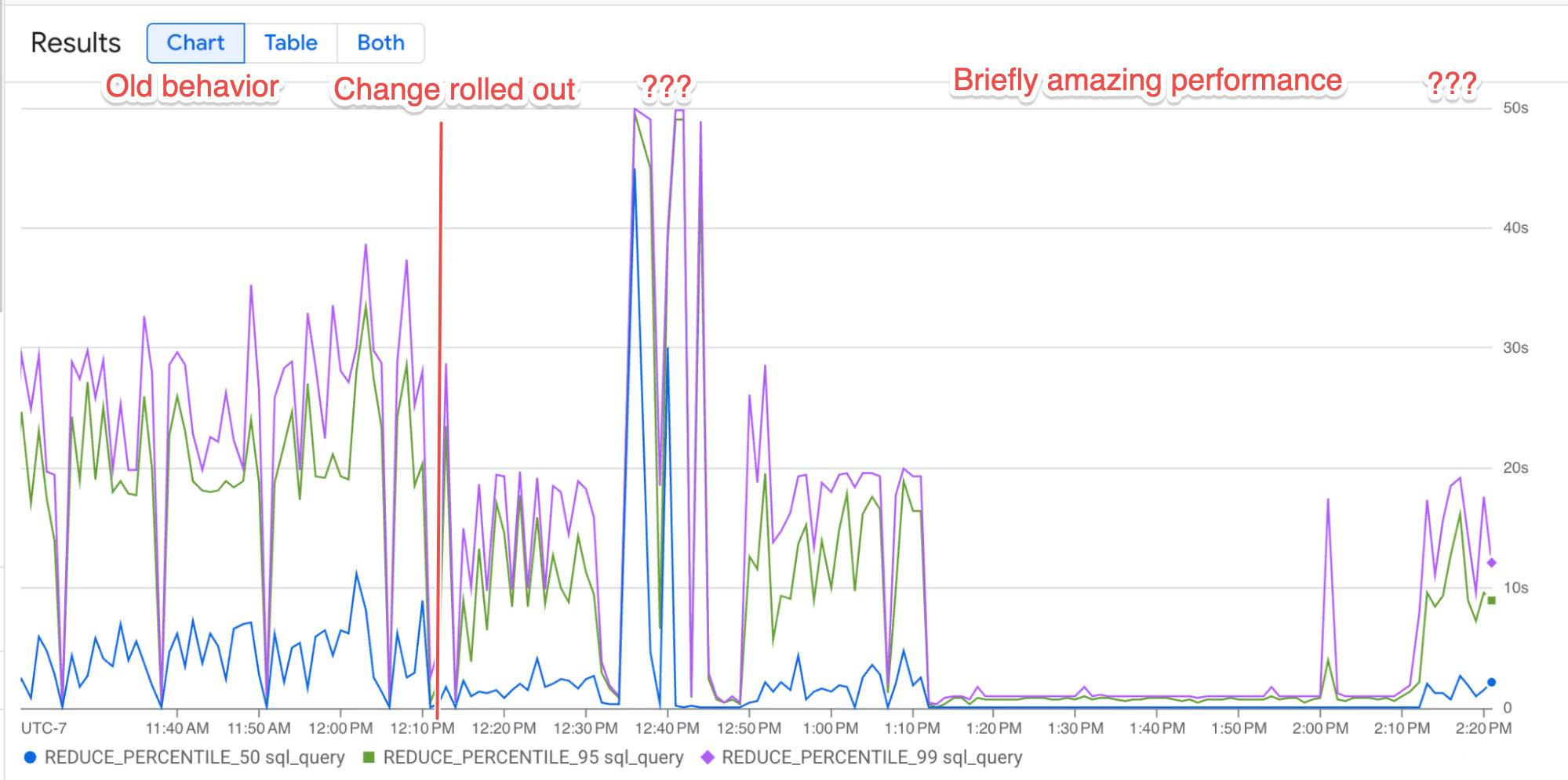
We still didn’t understand what was going on, but without a clear way forward we went back to working on regular application features for a while, with the nagging feeling that something still wasn’t right.
Two weeks later
Background jobs were still slower than they had any business being. We had made some progress, and still believed that the networking between our containers and the database was somehow cursed, since the change to the second generation environment had improved things slightly. I had just submitted a PR to increase the minimum CPU allocated to our instances to 2 CPUs when we started discussing the possibility of CPU throttling. Reading through the Cloud Run billing settings docs, one line jumped out:
The CPU allocated to all containers in an idle instance depends on the configured billing settings.
Wait. Idle instances? Is an instance with no in-flight HTTP request considered "idle," even if it's running goroutines doing background work?
Cloud Run has two billing modes: request-based and instance-based. Under request-based billing (the default), your container's CPU is throttled when no HTTP request is being processed. Not "scaled down." Throttled. The degree of throttling depends on the runtime environment. The reason we’d seen a speedup with the switch to the second generation environment wasn’t because of network performance, it was because it can’t throttle as aggressively as the first generation.
Our entire background processing system runs as scheduled goroutines that aren't tied to HTTP requests at all. Every single one of those goroutines had been running under heavy CPU throttling the entire time. The fix is an annotation, which translates to setting your instances to instance-based billing:
metadata:
  annotations:
    run.googleapis.com/cpu-throttling: "false"
Now your container gets full CPU all the time, regardless of whether it's currently handling an HTTP request. You pay slightly more, because you're billed for the wall-clock time your instance exists rather than just the time it's serving requests, but for a service like ours, which runs background jobs continuously anyway, that’s the behavior we expect.
We rolled out the change and watched the metrics dashboards. The 99th percentile query latency on our background jobs collapsed:
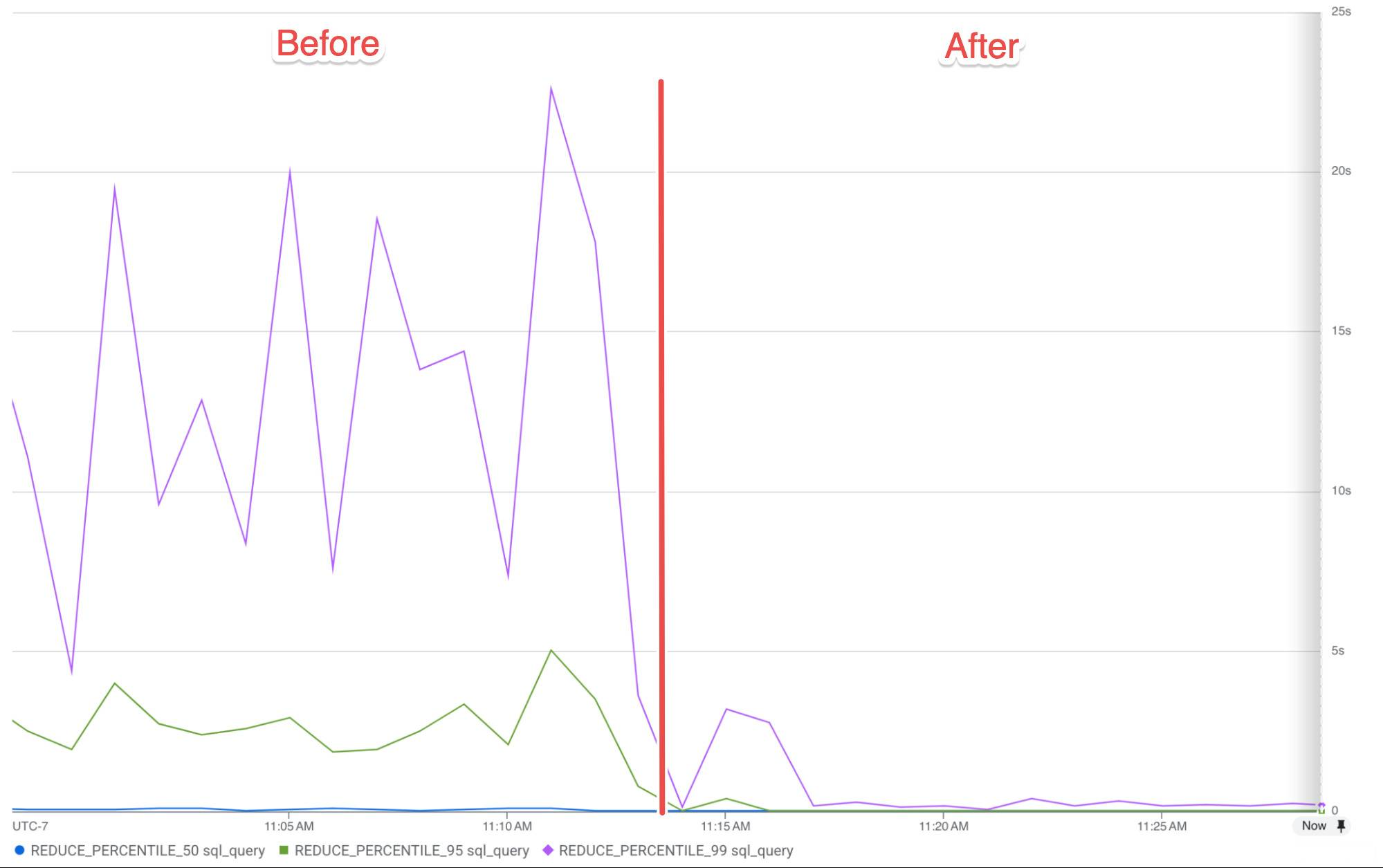
Background jobs that had been taking tens of minutes now finished in under thirty seconds, the remaining time limited mostly by integration APIs rate limiting. Pool acquisition contention dropped to nothing because individual queries were now finishing as fast as they should have all along. All of the batching work, all of the trace improvements, all of the VPC investigation, none of it was the actual fix. The fix was one annotation that, in retrospect, we should have set on day one.
Why we don’t regret the work we put in
The temptation, after a debugging journey like this, is to conclude that we wasted two months on and off on work we didn’t need. We didn't.
OpenTelemetry was worth it. The richer span metadata, the ability to run a local trace collector, the integration ecosystem. All of it survived past the fix and is still paying dividends. When the next mystery slow path shows up, we'll see it faster.
Query Insights is worth keeping on. Enabling it is free, you only pay for data retention. It didn't help us find this particular bug, but it may help us narrow down issues with slow running queries quicker in the future. It’s better to have it before you need it. If you're running on Cloud SQL and you don't have it on, turn it on.
The batching work was worth doing. 1,500 sequential SELECTs in a single background job was a problem regardless of CPU throttling. We would have had to fix that eventually. We just fixed it earlier than we needed to.
Pinning the execution environment was worth doing. The Cloud Run scheduler picking a different environment under your feet makes for an unpredictable metric baseline. Even if the environment generation difference hadn't mattered for latency, the fact that the choice is invisible and non-deterministic is enough reason to pin it explicitly.
The annotation we should have set on day one. If you're running on Cloud Run and you have any kind of in-application background work (goroutines you start from a request handler, scheduled jobs, async queue consumers, anything), set run.googleapis.com/cpu-throttling: "false". The performance characteristics of CPU-throttled background work are so bad, and so non-obviously bad, that the marginal cost of always-on CPU is basically irrelevant compared to the cost of debugging this for two months.
Why didn’t we find it sooner?
We had good observability, better than most. We were actively looking. Why did we spend two months on and off on hypotheses that weren't the answer before stumbling onto the one that was?
There are three reasons.
The first is that the symptoms looked exactly like a database problem. Multi-second SQL queries, connection pool exhaustion, lock contention candidates. When you see those symptoms, your professional instinct is to investigate the database. And the database was, in some sense, not actually slow. It was the client that was being suspended mid-flight by a cgroup, holding a connection while it slept. From the database's perspective, the client just took a really long time to send or receive the next byte. From our traces' perspective, the query took five seconds. Same data, completely different interpretation.
The second is that "Cloud Run throttles your CPU when no request is in flight" is a non-obvious property of the platform. It is documented. It just isn't documented in the places you'd look while you're debugging slow code. The billing settings page describes the two billing modes accurately, but it's framed entirely as a cost question, not a performance one. The general development tips page mentions in a single sentence that you should use instance-based billing for background activity, but it's one bullet among dozens of unrelated tips. The 2021 launch blog post for the always-on CPU feature is the clearest explanation of the model, and it's a four-year-old blog post. None of these are the pages you read when your database query performance is bad.
We aren't the only people to have hit this. After we figured it out, I traded notes with another Cloud Run user who'd run into the same problem from a different angle. They were doing background processing triggered by Pub/Sub, and they'd convinced themselves it couldn't be a CPU allocation issue, because the docs say CPU is allocated "during request processing time" and they had a request in flight the whole time the processing was happening. What they'd missed was that they were acknowledging the Pub/Sub message early to avoid redelivery, and continuing the actual work in the background afterwards. The HTTP request had returned. Cloud Run considered the instance idle. The work that the user thought of as "request processing" was, from the platform's perspective, background work, and it was being throttled accordingly. The phrase "request processing time" is doing a lot of work in those docs, and it doesn't mean what most people reading it would assume.
The third reason is subtle and unexpected: Go handled this absurdly under-resourced situation with grace. Our service was being asked to do real work on roughly 5% of a vCPU, and it kept working. Goroutines parked, the scheduler kept multiplexing, the runtime kept making forward progress. Queries finished eventually. Background jobs completed eventually. Nothing crashed, nothing OOM'd, nothing fell over. The system was, in a meaningful sense, operating correctly the whole time. It was just slow.
That's a real strength of the Go runtime, and we're glad we wrote the backend in Go. But it also presented us with a steady-state of "everything still works, it's just bad," which is one of the hardest failure modes to debug, because it doesn't trigger any of the signals operators normally rely on. The dashboards were green. The error rate was fine. The service was up. It was just inexplicably slow, in ways that wasn’t visible to users, for months.
If there's a moral to this story, it's that observability is necessary but not sufficient. We could see exactly what was happening (pool waits, slow queries, sluggish goroutines) and the picture was so consistent with "the database is overloaded" that we kept looking at the database. Better data doesn't fix that on its own. You also need to keep poking at your assumptions about the platform you're running on.
Clearly the real moral of the story though, is to read the billing docs.